Have you ever wondered how websites know where you're from? Or how you can track who clicked on a link you shared? This guide will explain IP tracking in simple terms that anyone can understand.
IP Tracking Process Flow
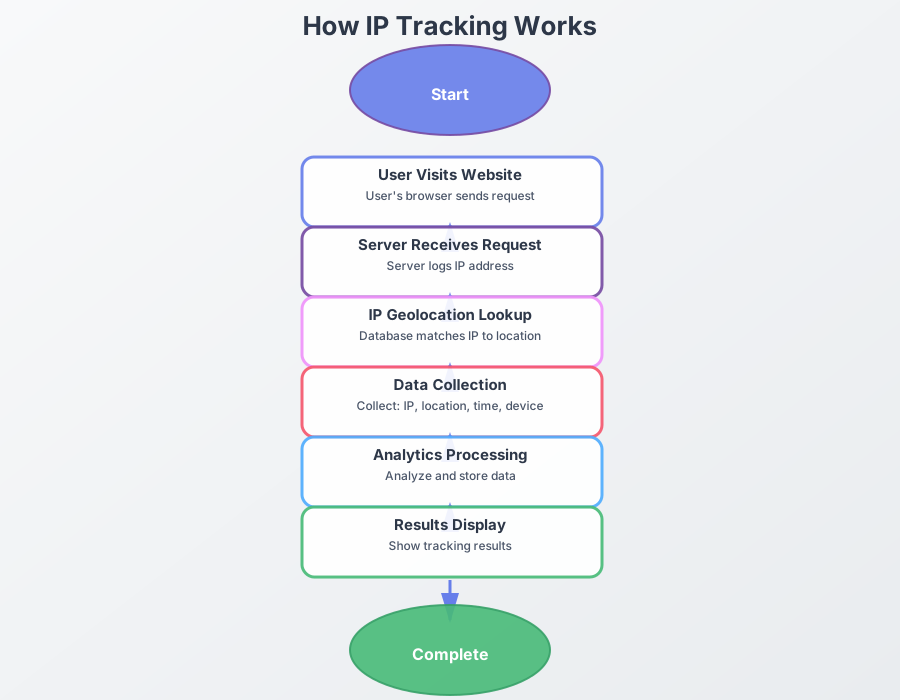
Interactive Flow Diagram
What is IP Tracking?
IP tracking is like a digital address label. When you visit a website, your device sends its "address" (called an IP address) to that website. The website can then use this address to figure out roughly where you are in the world.
Simple explanation:
- An IP address is like a digital address label
- Each time you visit a website, your device shares that label with the server
- The site can use it to estimate your city or region
- But it does not reveal your exact street address or your real name
How Does IP Tracking Work?
Here's how it works in simple steps:
- You visit a website: When you type a website address and press Enter, your browser sends a request.
- Your IP is sent: This request includes your IP address (like your return address on a letter).
- The website receives it: The website's server gets your request and records your IP address.
- Location is determined: The website can look up your IP address in a database to find your approximate location (usually city-level).
- Information is shown: The website can use this information to show you relevant content or track your visit.
Common Uses of IP Tracking
1. Link Tracking
Track link clicks
You can create special links that tell you when someone clicks them. This is useful for:
- Seeing who clicked on a link you shared
- Finding out where they're located
- Knowing what device they used
- Tracking when they clicked
Example: Share a link to a funny video. When someone clicks it, you'll see their location and device info.
2. Email Tracking
Track email opens
You can add a tiny invisible image to emails that tells you when someone opens your email:
- Know when your email was opened
- See the location of the person who opened it
- Find out what device they used
Example: Send an email to a friend. When they open it, you'll get a notification with their location.
3. Website Visitor Tracking
Track website visitors
If you have a website, you can see information about your visitors:
- Where they're from (city/country)
- What device they're using
- What browser they're using
- When they visited
How to Use IP Tracking
Using IP tracking is easier than you might think. Here's how to get started:
Simple steps:
- Choose a tool: Use a free IP tracking service like WhatsTheirIP.tech
- Create a tracking link: Generate a special link that will track clicks
- Share the link: Send it to someone via email, social media, or any other way
- Wait for clicks: When someone clicks, you'll see their information
- View results: Check the tracking dashboard to see all the details
What Information Can You See?
When you track someone's IP, you can typically see:
- Location: City and country (usually accurate to the city level)
- Device: What type of device they're using (phone, computer, tablet)
- Browser: What web browser they're using
- Time: When they clicked or visited
- ISP: Their internet service provider
Important note
IP tracking shows approximate location, not exact address. It can't tell you:
- Your exact street address
- Your name or personal identity
- What you're doing on your device
Privacy and Ethics
It's important to use IP tracking responsibly:
- Be transparent: Let people know if you're tracking them (when appropriate)
- Respect privacy: Don't use tracking for harmful purposes
- Follow laws: Make sure you're following privacy laws in your area
- Use wisely: Only track when you have a legitimate reason
Common Questions
Common questions
Q: Is IP tracking legal?
A: Yes, IP tracking is generally legal when used for legitimate purposes. However, you should always respect privacy laws and be transparent about tracking.
Q: How accurate is IP tracking?
A: IP tracking is usually accurate to the city level. It's not precise enough to find someone's exact address.
Q: Can I track someone without them knowing?
A: Technically yes, but it's important to use tracking ethically and legally. Always consider privacy and consent.
Q: Do I need technical skills to use IP tracking?
A: No! Tools like WhatsTheirIP.tech make it easy for anyone to use, no technical knowledge required.
Q: Can someone hide their IP address?
A: Yes, people can use VPNs or proxies to hide their real IP address. This makes tracking less accurate.
Getting Started
Ready to try IP tracking? It's free and easy to get started:
Free IP tracking tools
- Completely free to use
- No signup required
- Easy to use
- Real-time tracking results
- Supports link and email tracking
Related Articles
- How IP Tracking Works
- How to Track IP from a Link
- How to Get IP from Email
- How to Protect Your IP Address